The Influence of Plumbing on Programming

I strive to produce concise but readable code. One of my favorite tactics - minimizing the number of local variables - usually can be achieved through minting or discovering higher-level abstractions and joining them together in a more or less declarative way.

Thus, when writing Go code, I often utilize io.Reader and io.Writer interfaces and the related io machinery. A function like io.Copy(w io.Writer, r io.Reader) can be a perfect example of such a higher-level abstraction - it's a succinct at devtime and efficient at runtime way to move some bytes from the origin r to the destination w.

But conciseness often comes at a price, especially in the case of I/O handling - getting a sneak peek at the data that's being passed around becomes much trickier in the code that relies on the Reader and Writer abstractions.

So, is there an easy way to see the data that comes out of readers or goes into writers without a significant code restructure or an introduction of temporary variables?
Read more

How To Call Kubernetes API from Go - Types and Common Machinery

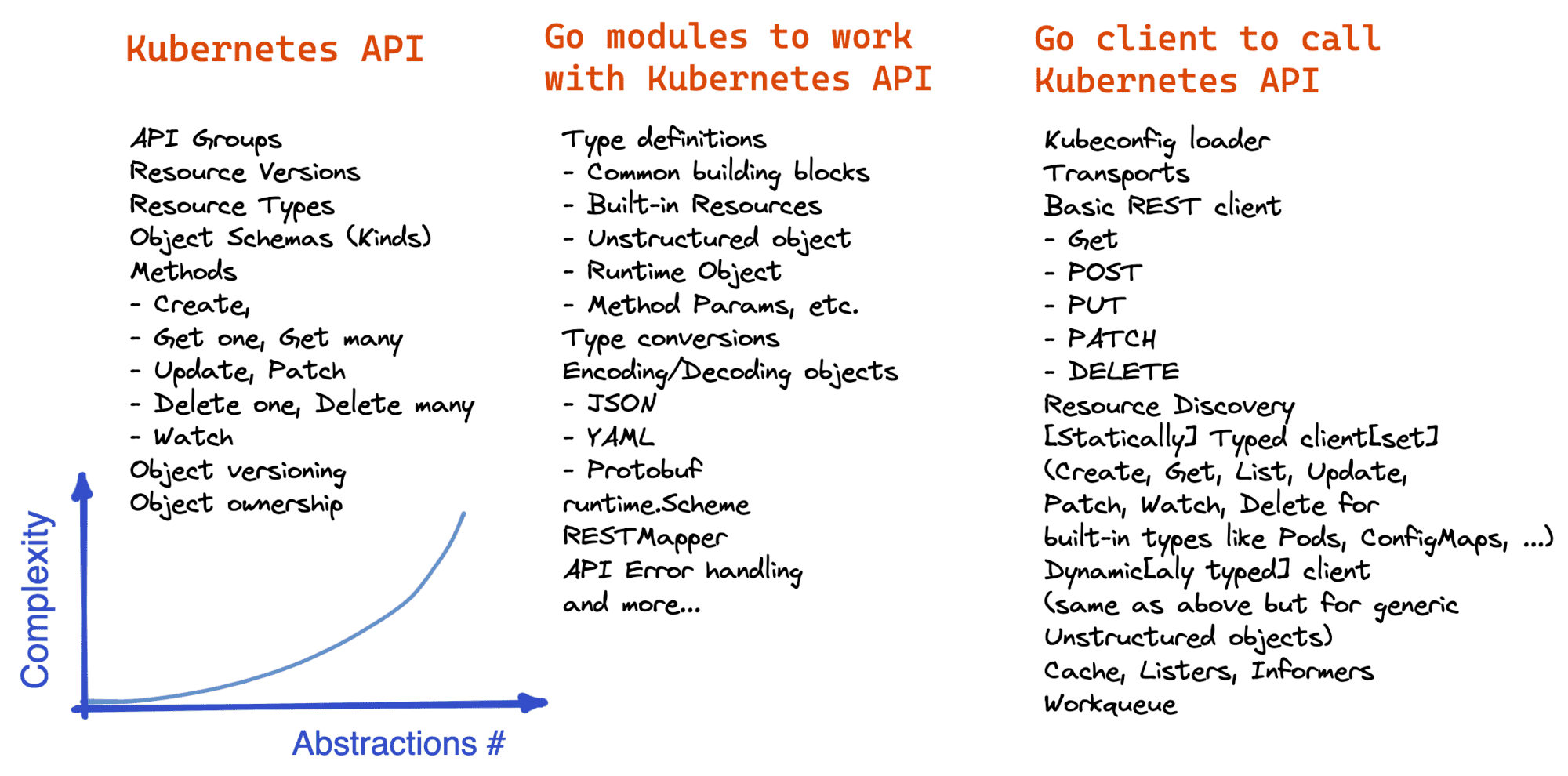
The official Kubernetes Go client comes loaded with high-level abstractions - Clientset, Informers, Cache, Scheme, Discovery, oh my! When I tried to use it without learning the moving parts first, I ran into an overwhelming amount of new concepts. It was an unpleasant experience, but more importantly, it worsened my ability to make informed decisions in the code.

So, I decided to unravel client-go for myself by taking a thorough look at its components.

But where to start? Before dissecting client-go itself, it's probably a good idea to understand its two main dependencies - k8s.io/api and k8s.io/apimachinery modules. It'll simplify the main task, but that's not the only benefit. These two modules were factored out for a reason - they can be used not only by clients but also on the server-side or by any other piece of software dealing with Kubernetes objects.

How to learn Kubernetes API Go client.

Read more

How To Call Kubernetes API using Simple HTTP Client

There are plenty of reasons to call the Kubernetes API using a CLI (like curl) or GUI (like postman) HTTP client. For instance, you may need finer-grained control over Kubernetes Objects than kubectl provides or just want to explore the API before trying to access it from code.

This article is not a mere list of handy commands but a thoughtful walk-through revealing some interesting problems you may stumble upon while calling the Kubernetes API from the command line. It covers the following topics:

  • How to get the Kubernetes API server address
  • How to authenticate the API server to clients
  • How to authenticate clients to the API server using certificates
  • How to authenticate clients to the API server using tokens
  • Bonus: How to call the Kubernetes API from inside a Pod
  • How to perform the basic CRUD operations on Kubernetes Objects with curl
  • How to access the Kubernetes API directly using the kubectl's raw mode
  • Bonus: How to see what API requests a kubectl command like apply sends.

Happy reading!

Read more

Kubernetes API Basics - Resources, Kinds, and Objects

This is the first post in the series of articles on how to work with the Kubernetes API from code. The Kubernetes API is a bit more advanced than just a bunch of HTTP endpoints thrown together. Therefore, it's vital to understand the Kubernetes API structure and be fluent in the terminology before trying to access it from code. Otherwise, the attempt will be quite painful - the official Go client comes with so many bells and whistles that trying to wrap your head around the client and the API concepts simultaneously might overwhelm you quickly.

The Kubernetes API is massive - it has hundreds of endpoints. Luckily, it's pretty consistent, so one needs to understand just a limited number of ideas and then extrapolate this knowledge to the rest of the API. In this post, I'll try to touch upon the concepts I found the most fundamental. I'll favor simplicity and digestability over academic correctness and completeness of the material. And as usual, I just share my understanding of things and my way of thinking about the topic - so, it's not an API manual but a record of personal learning experience.

Read more

Containers 101: attach vs. exec - what's the difference?

The difference between docker (or podman, or containerd) attach and exec commands is a common source of confusion. And it's understandable - these two commands have similar arguments and, at first sight, similar behavior. However, attach and exec aren't interchangeable. They aim to cover different use cases, and the implementation of the commands also differs. But still, it might be hard to remember when to use which command.

Since I'm no fan of brute memorization, here is my recipe of how I managed to internalize the difference. Long story short, connecting the dots between the knowledge of what containers really are under the hood and these two commands helped to grasp the difference almost instantly. And like any true understanding, it freed me from relying only on my memory and gave me a chance to extrapolate the knowledge on a similar tech such as Kubernetes 😉

Read more